decal
A declarative Rust DSL for composing 2D scenes and rendering them to SVG or PNG
Getting started
Add the crate to your Cargo.toml:
cargo add decalA minimal scene:
use decal::prelude::*;

fn main() {
    let mut engine = Engine::new(EngineOptions::default());

    let mut scene = decal! {
        Block {}
            .size(256)
            .background(rgb(0xffffff))
    };

    let (svg, _size) = engine
        .vectorize(&mut scene, &VectorizeOptions::default())
        .unwrap();

    std::fs::write("out.svg", svg).unwrap();

    let (pixmap, _size) = engine
        .rasterize(&mut scene, &RasterizeOptions::default())
        .unwrap();

    pixmap.save_png("out.png").unwrap();
}
Engine setup
Engine manages font loading and an internal image cache. You create it once and reuse it across renders.
let mut engine = Engine::new(EngineOptions {
    fonts: FontRegistry::new()
        .load_font("Space Mono", include_bytes!("Space-Mono.ttf"))
        .load_font("Inter Bold", include_bytes!("Inter-Bold.ttf")),
    ..Default::default()
});
To load system fonts instead of bundling them:
let mut engine = Engine::new(EngineOptions {
    fonts: FontRegistry::new().load_system_fonts(),
    ..Default::default()
});
You can also add fonts to an existing engine after construction:
engine.append_font("Space Mono", include_bytes!("Space-Mono.ttf"));The image cache defaults to 128 entries. To change it:
use std::num::NonZeroUsize;

let mut engine = Engine::new(EngineOptions {
    image_cache_capacity: NonZeroUsize::new(32).unwrap(),
    ..Default::default()
});
The decal! macro
Scenes are built with the decal! macro. Each node takes optional children in {} (except atomic nodes such as Image and Text, which cannot contain children) and optional style methods chained after the closing brace. The result is a Scene value.
let mut scene = decal! {
    Column {
        Text("Hello")
            .font_size(48.0)
        Text("World")
            .font_size(24.0)
            .opacity(0.5)
    }
    .gap(16)
    .padding(32)
    .background(rgb(0xfafaf8))
};
Control flow works inside the macro body: if, for, while, loop, and match are supported for conditional rendering:
let items = vec!["one", "two", "three"];

let mut scene = decal! {
    Column {
        'x: for label in &items {
            Text(label).font_size(24.0)

            if label == "two" {
                break 'x;
            }
        }
    }
    .gap(8)
    .padding(16)
};
let show_badge = true;
let mut scene = decal! {
Row {
Text("Status")
if show_badge {
Text("passing")
.background(rgb(0x2a7a40))
.padding((4, 8))
}
}
.gap(8)
.align_items(AlignItems::Center)
};Node types
Row & Column
Flex containers: Row lays children out horizontally, Column vertically.
decal! {
    Row {
        Text("Left")
        Text("Right")
    }
    .justify_content(JustifyContent::SpaceBetween)
    .padding(16)
}
Block
A block-level container. It can also act as a flex or grid container (using display()):
decal! {
    Block {}
        .size((800, 400))
        .display(Display::Flex)
        .background(rgb(0x1a1a2e))
}
Text & Image
Takes a string or a text! span, more on that below. Image takes a source and intrinsic dimensions.
// external image reference
Image("https://example.com/photo.jpg", 200.0, 200.0)

// inline SVG, renders verbatim
Image(ImageSource::svg(r#"<svg>...</svg>"#), 64.0, 64.0)
Snippet
Lets you write Rust code inside a scene:
let scene = decal! {
    Block {
        Snippet { let i = 0; }

        if i == 1 {
            Text("conditional text")
        }
    }
}
Common style methods
Sizing
.size(256) // width and height
.size((1200, 630)) // width, height as tuple
.width(pct(100.0)) // percentage of parent
.height(40)
.min_width(200)
.max_width(800)
Spacing
.padding(32)
.padding((16, 32)) // vertical, horizontal
.padding_x(24)
.padding_top(8)
.margin(16)
.margin_x(-80.0) // negative margins
.gap(16) // space between children
Backgrounds and borders
.background(rgb(0xff0000))
.background(rgba((255, 0, 0, 0.5)))
.bg(rgb(0x1a1a2e)) // alias for background

.border_width(2.0)
.border_color(rgb(0xcccccc))
.corner_radius(8.0)
.corner_radius((8.0, 8.0, 0.0, 0.0)) // tl, tr, br, bl
Typography (cascades from parent to children)
.font_family("Space Mono")
.font_size(24.0)
.line_height(32.0)
.font_weight(FontWeight::Bold)
.font_style(FontStyle::Italic)
.letter_spacing(1.5)
.color(rgb(0x333333))
.text_align(TextAlign::Center)
.text_wrap(TextWrap::Word)
.ellipsize(Ellipsize::End)
Flex layout
.align_items(AlignItems::Center)
.align_content(AlignContent::SpaceBetween)
.justify_content(JustifyContent::SpaceBetween)
.flex_grow(1.0)
.flex_wrap(FlexWrap::Wrap)
.reversed(true)
Gradients
LinearGradient and RadialGradient can be used anywhere a background or color is accepted.
// direction helpers
LinearGradient::right()
LinearGradient::left()
LinearGradient::top()
LinearGradient::bottom()
LinearGradient::bottom_left()

// arbitrary angle in degrees
LinearGradient::angle(135.0)

// add stops
LinearGradient::right()
    .stops([
        (0.0, rgb(0x667eea)),
        (1.0, rgb(0x764ba2)),
    ])
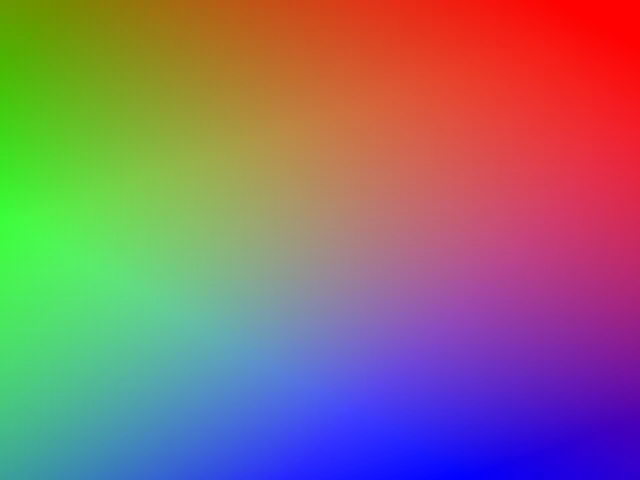
Multiple gradients stack as layers:
let gradient_list = [
    LinearGradient::angle(336.0)
        .stops([(0.0, rgb(0x0000ff)), (FRAC_1_SQRT_2, rgba(0x0000ff00))]),
    LinearGradient::angle(127.0)
        .stops([(0.0, rgb(0x00ff00)), (FRAC_1_SQRT_2, rgba(0x00ff0000))]),
    LinearGradient::angle(217.0)
        .stops([(0.0, rgb(0xff0000)), (FRAC_1_SQRT_2, rgba(0xff000000))]),
];

let mut scene = decal! {
    Block {}
        .size((640, 480))
        .background(gradient_list)
};
Rich text with text!
The text! macro composes multi-span text with per-span styles:
use decal::prelude::*;

let label = text! {
    "username",
    "/",
    ("repo-name", { weight: FontWeight::Bold })
};

decal! {
    Text(label).font_size(48.0)
}
Sub-scenes
A Scene produced by decal! can be embedded inside another scene with Scene(...). This is how you compose reusable components:
use decal::prelude::*;

fn badge(label: &str, value: &str, color: u32) -> Scene {
    decal! {
        Row {
            Row {
                Text(label)
            }
                .padding((10, 14))
                .background(rgb(0x2d2d3a))

            Row {
                Text(value).width(pct(100.0))
            }
                .flex_grow(1.0)
                .padding((10, 14))
                .text_align(TextAlign::Center)
        }
            .corner_radius(8.0)
            .background(rgb(color))
    }
}

fn main() {
    let mut engine = Engine::new(EngineOptions::default());
    let mut badges = decal! {
        Column {
            Scene(badge("build", "passing", 0x2a7a40))
            Scene(badge("version", "0.5.0", 0x2a4a7a))
            Scene(badge("license", "MIT", 0x4a2a7a))
        }
            .gap(16)
            .padding(32)
            .font_size(22.0)
            .line_height(28.0)
            .font_family("monospace")
            .font_weight(FontWeight::Bold)
            .color(rgb(0xd8d8d8))
    };

    let (pixmap, _size) = engine
        .rasterize(&mut badges, &RasterizeOptions::default())
        .unwrap();

    pixmap.save_png("./output.png").unwrap();
}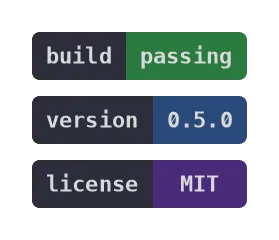
Typography set on a parent cascades into sub-scenes, so you can control font and color from the outer container.
Filters
Filter::new takes a closure that chains SVG filter primitives as a dataflow graph. All SVG filter primitives are supported.
let mut scene = decal! {
    Block {}
        .size((640, 320))
        .background(rgb(0x0))
        .fx(
            Filter::new(|ctx| {
                ctx.composite()
                    .input(
                        ctx.specular_lighting(LightSource::distant_light(225.0, 35.0))
                            .input(
                                ctx.turbulence()
                                    .fractal_noise()
                                    .base_freq(0.1)
                                    .num_octaves(4)
                                    .finish(),
                            )
                            .surface_scale(5.0)
                            .specular_exponent(20.0)
                            .lighting_color(rgb((255, 240, 200)))
                            .finish(),
                    )
                    .input2(FilterInput::source_alpha())
                    .operator(CompositeOperator::r#in())
                    .finish();
            })
        )
};
Text stencils
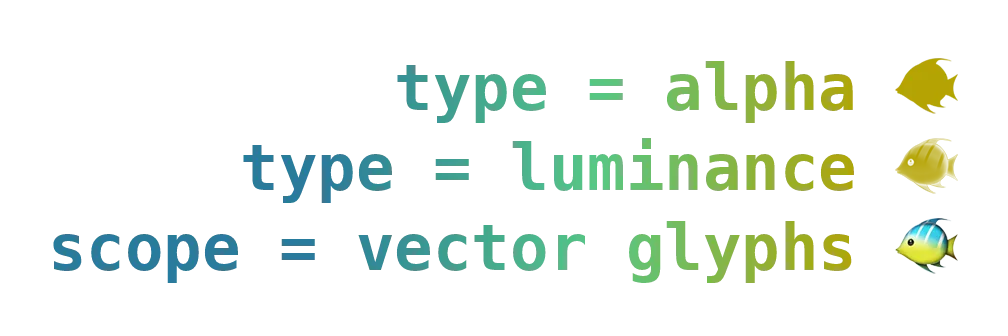
.stencil(paint) renders text as a mask and paints through it. This lets you fill text with a gradient:
let gradient = LinearGradient::right().stops([
    (0.3, rgb(0x2a7b9b)),
    (0.6, rgb(0x57c785)),
    (0.9, rgb(0xb5a302)),
]);

let mut scene = decal! {
    Column {
        Text("type = alpha 🐠")
            .stencil(gradient.clone())
            .stencil_type(StencilType::Alpha)

        Text("type = luminance 🐠")
            .color(rgb(0xffffff))
            .stencil(gradient.clone())
            .stencil_type(StencilType::Luminance)

        Text("scope = vector glyphs 🐠")
            .stencil(gradient)
            .stencil_scope(StencilScope::VectorGlyphs)
    }
        .size(pct(100.0))
        .padding(48)
        .align_items(AlignItems::Stretch)
        .font_size(64.0)
        .line_height(80.0)
        .font_weight(FontWeight::Bold)
        .text_align(TextAlign::End)
};
Grid layout
Available under the grid feature flag:
let children = [
    (0xe47a2c, (1, 22), (1, 22)),
    (0xbaccc0, (1, 23), (22, 35)),
    (0x6c958f, (14, 22), (27, 35)),
    (0x40363f, (17, 22), (22, 27)),
    (0xd7a26c, (14, 17), (22, 25)),
    (0xae4935, (14, 17), (25, 27)),
    (0xf7e6d4, (16, 17), (26, 27)),
    (0x2f3e46, (16, 17), (25, 26)),
];

let mut scene = decal! {
    Grid {
        for (color, r, c) in children {
            Block {}
                .bg(rgb(color))
                .grid_row(Line { start: line(r.0), end: line(r.1) })
                .grid_column(Line { start: line(c.0), end: line(c.1) })
        }
    }
        .grid_template_columns(vec![fr(1.0); 34])
        .grid_template_rows(vec![fr(1.0); 21])
        .size((800.0, 800.0 * 21.0 / 34.0))
};
Streaming SVG output
To write SVG directly to a file or HTTP response without allocating a String, use stream_vector:
let mut buf = String::new(); // or any fmt::Write

engine.stream_vector(&mut buf, &mut scene, &VectorizeOptions::default())?;
Loading custom image
By default, href images are fetched with ureq. You can override this with your own resolver:
use std::sync::Arc;

let options = RasterizeOptions {
    image: ImageOptions {
        href_string_resolver: Some(Arc::new(|href, _opts| {
            let data = std::fs::read(href).ok()?;
            let data = Arc::new(data);
            match infer::get(&data)?.mime_type() {
                "image/png" => Some(usvg::ImageKind::PNG(data)),
                "image/jpeg" => Some(usvg::ImageKind::JPEG(data)),
                _ => None,
            }
        })),
        ..Default::default()
    },
    ..Default::default()
};
To bypass caching for specific URLs:
ImageOptions {
    cache_ignore_list: vec!["https://example.com/ignored.png".into()],
    ..Default::default()
}