decal
A declarative Rust DSL for composing 2D scenes and rendering them to SVG or PNG
Decal is a declarative framework for composing 2D scenes and rendering them into SVG or PNG.
The crate ecosystem consists of primitives to define scene hierarchies, along with a rendering engine to vectorize and rasterize those structures.
Getting started
The following provides a minimal scene containing a 256x256 square with a #fff background:
use decal::prelude::*;

fn main() {
    let mut engine = Engine::new(EngineOptions::default());

    let mut scene = decal! {
        Block {}
            .size(256)
            .background(rgb(0xffffff))
    };

    let (svg, _size) = engine
        .vectorize(&mut scene, &VectorizeOptions::default())
        .unwrap();

    std::fs::write("out.svg", svg).unwrap();

    let (pixmap, _size) = engine
        .rasterize(&mut scene, &RasterizeOptions::default())
        .unwrap();

    pixmap.save_png("out.png").unwrap();
}
Engine setup
The Engine manages font loading and an internal image cache. It is instantiated once and reused across renders. You are recommended to share this engine instance across renders.
let mut engine = Engine::new(EngineOptions {
    fonts: FontRegistry::new()
        .load_font("Space Mono", include_bytes!("Space-Mono.ttf"))
        .load_font("Inter Bold", include_bytes!("Inter-Bold.ttf")),
    ..Default::default()
});
To load system fonts:
let mut engine = Engine::new(EngineOptions {
    fonts: FontRegistry::new().load_system_fonts(),
    ..Default::default()
});
Fonts can also be appended to an existing engine:
engine.append_font("Space Mono", include_bytes!("Space-Mono.ttf"));The image cache defaults to 128 entries. This capacity can be modified as follows:
use std::num::NonZeroUsize;

let mut engine = Engine::new(EngineOptions {
    image_cache_capacity: NonZeroUsize::new(32).unwrap(),
    ..Default::default()
});
The decal! macro
Scenes are constructed utilizing the decal! macro. Each node accepts optional children within {} (with the exception of atomic nodes such as Image and Text, which cannot contain children) and optional style methods chained after the closing brace. The resulting structure is a Scene value.
let mut scene = decal! {
    Column {
        Text("Hello")
            .font_size(48.0)
        Text("World")
            .font_size(24.0)
            .opacity(0.5)
    }
    .gap(16)
    .padding(32)
    .background(rgb(0xfafaf8))
};
Control flow primitives are supported natively within the macro body. Constructs such as if, for, while, loop, and match are available for conditional rendering operations:
let items = vec!["one", "two", "three"];

let mut scene = decal! {
    Column {
        'x: for label in &items {
            Text(label).font_size(24.0)

            if label == "two" {
                break 'x;
            }
        }
    }
    .gap(8)
    .padding(16)
};
let show_badge = true;
let mut scene = decal! {
Row {
Text("Status")
if show_badge {
Text("passing")
.background(rgb(0x2a7a40))
.padding((4, 8))
}
}
.gap(8)
.align_items(AlignItems::Center)
};Node types
Row & Column
The Row and Column nodes act as flex containers. Row positions children horizontally, whereas Column positions them vertically.
decal! {
    Row {
        Text("Left")
        Text("Right")
    }
    .justify_content(JustifyContent::SpaceBetween)
    .padding(16)
}
Block
The Block node provides a block-level container. It can be configured to act as a flex or grid container via the display() method:
decal! {
    Block {}
        .size((800, 400))
        .display(Display::Flex)
        .background(rgb(0x1a1a2e))
}
Text & Image
The Text node accepts a string or a text! span. The Image node requires a source and intrinsic dimensions.
// external image reference
Image("https://example.com/photo.jpg", 200.0, 200.0)

// inline SVG, renders verbatim
Image(ImageSource::svg(r#"<svg>...</svg>"#), 64.0, 64.0)
Snippet
The Snippet node permits the execution of native Rust code within a scene:
let scene = decal! {
    Block {
        Snippet { let i = 0; }

        if i == 1 {
            Text("conditional text")
        }
    }
}
Common style methods
Sizing
.size(256) // width and height
.size((1200, 630)) // width, height as tuple
.width(pct(100.0)) // percentage of parent
.height(40)
.min_width(200)
.max_width(800)
Spacing
.padding(32)
.padding((16, 32)) // vertical, horizontal
.padding_x(24)
.padding_top(8)
.margin(16)
.margin_x(-80.0) // negative margins
.gap(16) // space between children
Backgrounds and borders
.background(rgb(0xff0000))
.background(rgba((255, 0, 0, 0.5)))
.bg(rgb(0x1a1a2e)) // alias for background

.border_width(2.0)
.border_color(rgb(0xcccccc))
.corner_radius(8.0)
.corner_radius((8.0, 8.0, 0.0, 0.0)) // tl, tr, br, bl
Typography (cascades from parent to children)
.font_family("Space Mono")
.font_size(24.0)
.line_height(32.0)
.font_weight(FontWeight::Bold)
.font_style(FontStyle::Italic)
.letter_spacing(1.5)
.color(rgb(0x333333))
.text_align(TextAlign::Center)
.text_wrap(TextWrap::Word)
.ellipsize(Ellipsize::End)
Flex layout
.align_items(AlignItems::Center)
.align_content(AlignContent::SpaceBetween)
.justify_content(JustifyContent::SpaceBetween)
.flex_grow(1.0)
.flex_wrap(FlexWrap::Wrap)
.reversed(true)
Gradients
LinearGradient and RadialGradient are applicable wherever a background or color property is accepted.
// direction helpers
LinearGradient::right()
LinearGradient::left()
LinearGradient::top()
LinearGradient::bottom()
LinearGradient::bottom_left()

// arbitrary angle in degrees
LinearGradient::angle(135.0)

// add stops
LinearGradient::right()
    .stops([
        (0.0, rgb(0x667eea)),
        (1.0, rgb(0x764ba2)),
    ])
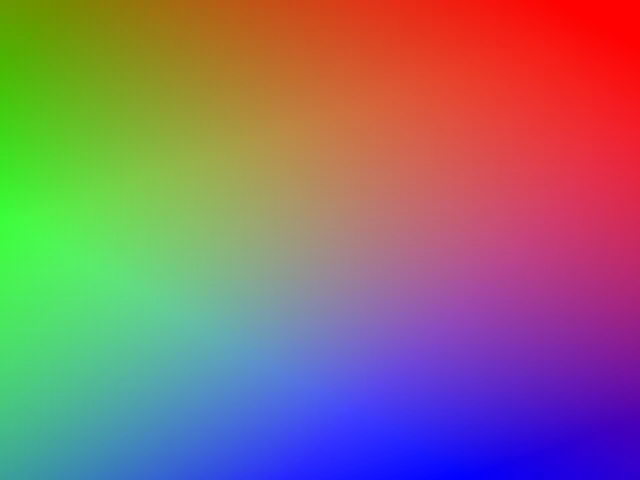
Multiple gradients can be stacked as layers:
let gradient_list = [
    LinearGradient::angle(336.0)
        .stops([(0.0, rgb(0x0000ff)), (FRAC_1_SQRT_2, rgba(0x0000ff00))]),
    LinearGradient::angle(127.0)
        .stops([(0.0, rgb(0x00ff00)), (FRAC_1_SQRT_2, rgba(0x00ff0000))]),
    LinearGradient::angle(217.0)
        .stops([(0.0, rgb(0xff0000)), (FRAC_1_SQRT_2, rgba(0xff000000))]),
];

let mut scene = decal! {
    Block {}
        .size((640, 480))
        .background(gradient_list)
};
Rich text with text!
The text! macro facilitates the composition of multi-span text structures, enabling per span styling:
use decal::prelude::*;

let label = text! {
    "username",
    "/",
    ("repo-name", { weight: FontWeight::Bold })
};

decal! {
    Text(label).font_size(48.0)
}
Sub-scenes
A Scene generated by the decal! macro can be embedded within another scene utilizing the Scene(...) node. This mechanism enables the composition of modular and reusable scenes:
use decal::prelude::*;

fn badge(label: &str, value: &str, color: u32) -> Scene {
    decal! {
        Row {
            Row {
                Text(label)
            }
                .padding((10, 14))
                .background(rgb(0x2d2d3a))

            Row {
                Text(value).width(pct(100.0))
            }
                .flex_grow(1.0)
                .padding((10, 14))
                .text_align(TextAlign::Center)
        }
            .corner_radius(8.0)
            .background(rgb(color))
    }
}

fn main() {
    let mut engine = Engine::new(EngineOptions::default());
    let mut badges = decal! {
        Column {
            Scene(badge("build", "passing", 0x2a7a40))
            Scene(badge("version", "0.5.0", 0x2a4a7a))
            Scene(badge("license", "MIT", 0x4a2a7a))
        }
            .gap(16)
            .padding(32)
            .font_size(22.0)
            .line_height(28.0)
            .font_family("monospace")
            .font_weight(FontWeight::Bold)
            .color(rgb(0xd8d8d8))
    };

    let (pixmap, _size) = engine
        .rasterize(&mut badges, &RasterizeOptions::default())
        .unwrap();

    pixmap.save_png("./output.png").unwrap();
}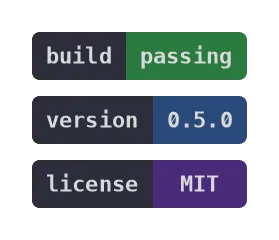
Typography properties applied to a parent cascade into sub scenes, allowing the outer container to dictate the font and color rendering.
Filters
The Filter::new function accepts a closure that chains SVG filter primitives into a dataflow graph. Full support for all SVG filter primitives is provided.
let mut scene = decal! {
    Block {}
        .size((640, 320))
        .background(rgb(0x0))
        .fx(
            Filter::new(|ctx| {
                ctx.composite()
                    .input(
                        ctx.specular_lighting(LightSource::distant_light(225.0, 35.0))
                            .input(
                                ctx.turbulence()
                                    .fractal_noise()
                                    .base_freq(0.1)
                                    .num_octaves(4)
                                    .finish(),
                            )
                            .surface_scale(5.0)
                            .specular_exponent(20.0)
                            .lighting_color(rgb((255, 240, 200)))
                            .finish(),
                    )
                    .input2(FilterInput::source_alpha())
                    .operator(CompositeOperator::r#in())
                    .finish();
            })
        )
};
Text stencils
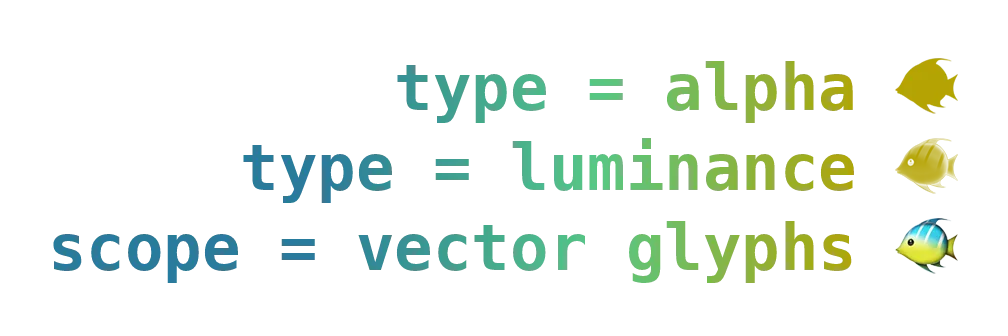
The .stencil(paint) method renders text as a mask and applies paint through it. This allows text to be filled with complex textures, such as gradients:
let gradient = LinearGradient::right().stops([
    (0.3, rgb(0x2a7b9b)),
    (0.6, rgb(0x57c785)),
    (0.9, rgb(0xb5a302)),
]);

let mut scene = decal! {
    Column {
        Text("type = alpha 🐠")
            .stencil(gradient.clone())
            .stencil_type(StencilType::Alpha)

        Text("type = luminance 🐠")
            .color(rgb(0xffffff))
            .stencil(gradient.clone())
            .stencil_type(StencilType::Luminance)

        Text("scope = vector glyphs 🐠")
            .stencil(gradient)
            .stencil_scope(StencilScope::VectorGlyphs)
    }
        .size(pct(100.0))
        .padding(48)
        .align_items(AlignItems::Stretch)
        .font_size(64.0)
        .line_height(80.0)
        .font_weight(FontWeight::Bold)
        .text_align(TextAlign::End)
};
Grid layout
Grid layout capabilities are available when the grid feature flag is enabled:
let children = [
    (0xe47a2c, (1, 22), (1, 22)),
    (0xbaccc0, (1, 23), (22, 35)),
    (0x6c958f, (14, 22), (27, 35)),
    (0x40363f, (17, 22), (22, 27)),
    (0xd7a26c, (14, 17), (22, 25)),
    (0xae4935, (14, 17), (25, 27)),
    (0xf7e6d4, (16, 17), (26, 27)),
    (0x2f3e46, (16, 17), (25, 26)),
];

let mut scene = decal! {
    Grid {
        for (color, r, c) in children {
            Block {}
                .bg(rgb(color))
                .grid_row(Line { start: line(r.0), end: line(r.1) })
                .grid_column(Line { start: line(c.0), end: line(c.1) })
        }
    }
        .grid_template_columns(vec![fr(1.0); 34])
        .grid_template_rows(vec![fr(1.0); 21])
        .size((800.0, 800.0 * 21.0 / 34.0))
};
Streaming SVG output
To stream SVG data directly to a file or HTTP response without allocating a String, the stream_vector method is utilized:
let mut buf = String::new(); // or any fmt::Write

engine.stream_vector(&mut buf, &mut scene, &VectorizeOptions::default())?;
Loading custom image
By default, href image sources are fetched utilizing the ureq library. This behavior can be overridden by supplying a custom resolver:
use std::sync::Arc;

let options = RasterizeOptions {
    image: ImageOptions {
        href_string_resolver: Some(Arc::new(|href, _opts| {
            let data = std::fs::read(href).ok()?;
            let data = Arc::new(data);
            match infer::get(&data)?.mime_type() {
                "image/png" => Some(usvg::ImageKind::PNG(data)),
                "image/jpeg" => Some(usvg::ImageKind::JPEG(data)),
                _ => None,
            }
        })),
        ..Default::default()
    },
    ..Default::default()
};
To bypass the caching mechanism for specific URLs:
ImageOptions {
    cache_ignore_list: vec!["https://example.com/ignored.png".into()],
    ..Default::default()
}